Industry guide
Jewellery showroom LED walls. Gold that looks like gold.
Your customer holds a bangle a metre from the screen. If the gold on the wall looks pale beside it, the wall is working against you. Here is how to get it right.
A jewellery showroom is lit for one job: making metal glow. Warm spotlights, polished counters, glass cases. Then a customer holds a 22-carat bangle a metre from your new LED wall, and the gold on the screen looks pale beside the gold in her hand. This guide is about closing that gap before you spend a rupee.
The short version
- Calibrate the white. Panels leave the factory at a cool 6,500 K. Have the wall tuned on site to your showroom lighting, against a real piece of gold.
- Pick the pitch from the nearest customer. P1.5 or P1.8 behind a counter, P2.5 for a feature wall seen from 2.5 m or more.
- Up to 600 nits, run low. An indoor panel dimmed well below full keeps glare off your glass cases.
- Get 3,840 Hz refresh in writing. Customers film everything. A low-refresh wall shows rolling bands on their phones.
- Budget. An 8 × 4 ft P1.8 counter wall is ₹3,27,500 + GST. A 10 × 6 ft P2.5 feature wall is ₹4,37,500 + GST. Both include the controller and installation.
Why does gold look wrong on most LED walls?
Gold lives in a narrow band of warm colour. On a screen whose white is too cool it drifts towards lemon or brass; too warm, and a diamond’s white fire turns cream. On a phone nobody notices. Above a counter where the real piece lies on velvet, everybody does.
Most indoor LED panels, including the fine-pitch modules we build with, are set at the factory to 6,500 K, a cool daylight white. Jewellery showrooms are lit far warmer, with spotlights chosen to flatter yellow metal. Put a 6,500 K wall in that room and it looks faintly blue next to everything around it. The gold on it looks tired.
Calibrate against a real piece, not a test pattern
The fix is not an exotic panel. It is calibration. The controller lets the installer shift the wall’s colour temperature, gamma and brightness. Do it after closing, with the showroom lights exactly as customers see them, a bangle held beside the screen and a film of the same bangle playing on it. Adjust until the two agree. Save that setting, and do not let anyone “brighten it up” later.
Two more specs protect the result. Grey scale of 14-bit or better keeps the soft gradients on polished metal smooth when the wall is dimmed; cheaper panels step through visible bands. And a 3,840 Hz refresh rate keeps the wall clean on camera, which matters in a trade where customers photograph every piece they shortlist. Both are on the spec sheet of our P1.8 LED wall. Why cameras see bands that eyes miss is in our refresh rate explainer.
Which pixel pitch does a jewellery showroom need?
Pixel pitch is the gap between LEDs, in millimetres. The working rule: the closest comfortable viewing distance in metres is roughly the pitch number. P2.5 looks smooth from 2.5 m. Step closer and the dots appear. Jewellery customers step closer than anyone.
| Where the wall goes | Nearest customer | Pitch | Per sq ft, installed |
|---|---|---|---|
| Behind the sales counter | 1.5 to 2 m | P1.5 or P1.8 | ₹12,250 or ₹8,250 + GST |
| Entrance pillar, portrait | About 2 m | P1.8 | ₹8,250 + GST |
| Feature wall facing the door | 2.5 m and beyond | P2.5 | ₹6,150 + GST |
| Facade above the entrance | 4 m and beyond | Outdoor P4 | ₹5,300 + GST |
Per sq ft prices include installation and exclude the controller and GST. Updated 29 September 2026.
Do not buy finer than the room needs. P1.2 at ₹14,650 per sq ft + GST only pays off when someone sits within about 1.2 m of the screen, which rarely happens in a showroom. And do not let anyone talk you into P2.5 behind a counter because it is cheaper. From the customer’s chair it will look like a grid.
How bright should a jewellery showroom LED wall be?
Less than you think. For a showroom with a glass front and bright interiors, an indoor panel of up to 600 nits is right, as our brightness guide explains. That is a ceiling, not a target. Inside, beside glass cases and mirror-finish counters, a wall at full output throws glare across the very pieces you want people to study.
Run the wall at a fraction of its rating during the day and lower again in the evening. PxlOS, our cloud CMS, schedules brightness and playlists by the hour from a phone, so nobody has to remember.
One exception. A screen that faces the street from behind the shop window is fighting daylight through glass. That needs an outdoor-grade panel, up to 4,500 nits. A standard indoor panel will look washed out there by mid-morning. The same glare is why most printed shopfronts go unread; see why shoppers walk past a storefront.
Where should the wall go in the showroom?
Behind the main counter
This is the wall customers see while they sit. Keep its bottom edge above the heads of your sales staff, keep it out of the direct throw of the spotlights, and check its reflection in the counter glass from a customer’s chair before the frame goes up. The free site survey includes a 3D mockup of the wall in your showroom, so you see this before you pay.
At the entrance
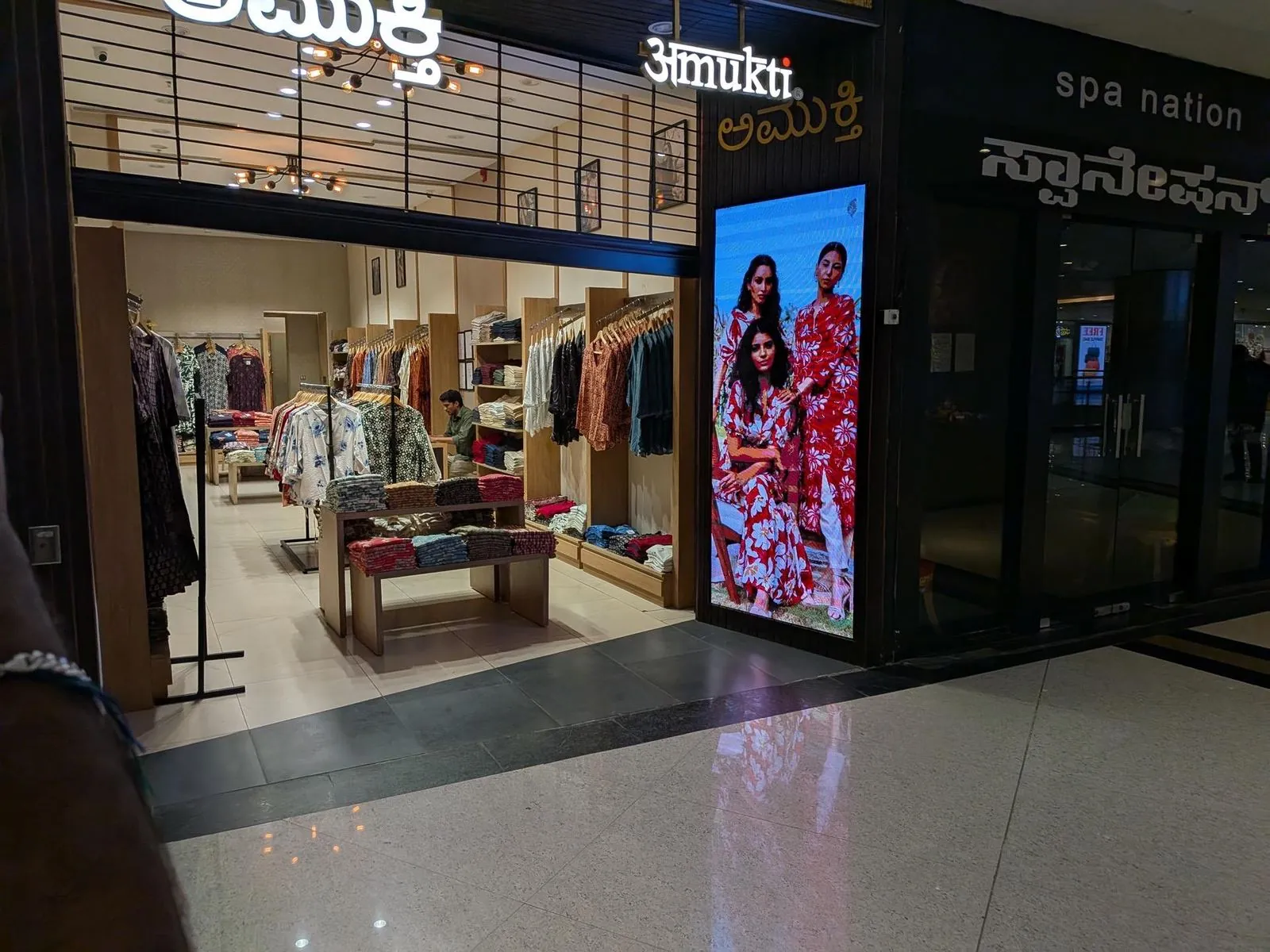
A portrait screen built into the pillar beside the door works like a moving window display. We did exactly this for Amukti, an ethnic-wear store in a Bengaluru mall: a fine-pitch portrait display in the entrance pillar that replaced a printed lightbox, with collection videos scheduled through PxlOS. The Amukti case study shows the build. For a jeweller, the same pillar carries the bridal collection in wedding season and the Akshaya Tritiya offer in spring.
On the facade
A road-facing screen above the entrance is an outdoor job: cabinets rated IP65 at the front and IP54 at the rear, far higher brightness and hard dimming after dark. Treat it as a separate purchase.
Where nobody can walk behind it
Showroom walls usually back onto a strong room, a column or built-in joinery. Choose front-service cabinets, where a technician removes a module from the room side with a magnetic tool. Our guide to front-service and rear-service walls explains the trade-off.
Jewellery
Warm light. True gold.
Calibrate the wall to your showroom, never the showroom to the wall.
What content sells jewellery on an LED wall?
Macro product films. A necklace filmed on a black background, turning slowly while light moves across the stones, shown life-size on a fine-pitch wall, does what no printed poster can. A few rules make it work.
- Shoot under the same colour temperature as your showroom, so the film and the calibrated wall agree.
- Use black or deep backgrounds. Stones stand out, and the wall runs cooler and draws less power.
- Keep the motion slow. One unhurried turn of a piece beats a fast-cut edit on a screen people stand close to.
- Keep it silent. Your sales staff are the conversation; the wall should not compete with them.
- Plan by season: bridal collections, Dhanteras, Akshaya Tritiya, and a daily rate board your staff update from a phone.
For playlists that change through the day, read our guide to content for retail LED displays.
Is an LED wall install safe in a jewellery showroom?
Plan the installation like any other work behind your shutters.
- Install in closed hours. Our own crew does the job, usually in one to two days, scheduled around your security staff. Walls arrive assembled and burn-in tested at our Bengaluru facility, so time on site is short.
- Keep the cameras clear. Mark every CCTV sightline on the plan before the frame is fixed. A new wall must not block a camera or create a blind corner.
- Lock the electronics. Put the controller and player in a locked cabinet, and decide who holds the content login.
- Give it clean power. A dedicated, earthed line with a stabiliser or online UPS. Voltage swings are what kill power supplies.
- Check fire safety. Cheap power supplies and loose wiring behind joinery are a real risk in a room full of wood and velvet. Our fire safety buyer’s guide lists what to ask for.
Once it is running, the wall is covered by our 2-year pixel-to-pixel onsite warranty. One dead pixel is a valid claim, and we respond within 24 hours in Bengaluru. 5% spare modules from the same production batch ship with every wall, so a replacement never shows as a patch of different colour. The warranty page has the full terms.
What does a jewellery showroom LED wall cost?
| Wall | Pitch | Price with controller |
|---|---|---|
| 8 × 4 ft counter wall | P1.8 | ₹3,27,500 + GST |
| 8 × 4 ft counter wall | P1.5 | ₹4,83,500 + GST |
| 10 × 6 ft feature wall | P2.5 | ₹4,37,500 + GST |
| 10 × 6 ft feature wall | P1.8 | ₹5,91,500 + GST |
| 10 × 6 ft facade | Outdoor P4 | ₹3,70,000 + GST, plus structure |
Installed by our crew, with PxlOS, 5% spare modules and the 2-year onsite warranty. GST at 18%. Structural and civil work quoted after the site survey.
Where to go next
The right wall disappears into the showroom. Customers stop noticing the screen and start noticing the gold. Begin with the jewellery showroom page and a photo of the wall behind your counter.
Questions? Answers.
Will an LED wall make our gold look pale or yellow?
Which pixel pitch should a jewellery showroom choose?
How much does an LED wall for a jewellery showroom cost in Bengaluru?
Can the wall be installed without closing the showroom?
See it running. Then decide.
Send your wall size on WhatsApp for a same-day price, or see indoor and outdoor walls running at our Jalahalli East experience centre in Bengaluru.
Prices are estimates: installed, controller extra, plus 18% GST. See every price