Technology
Refresh rate on LED video walls. Why some flicker on camera.
The wall looks perfect to your eye. Then someone films it and bands roll across the screen. Here is what refresh rate is, and how to check it before you pay.

An LED wall can look flawless in person and fall apart the moment someone points a phone at it: dark bands rolling up the screen, a shimmer across the reel, a flicker behind the speaker on the livestream. Nothing is broken. The wall’s refresh rate is simply too low for the camera. In a city where every launch, wedding and Saturday at the showroom ends up on Instagram, that is not a small spec.
The short version
- Refresh rate is how many times per second the LED driver chips redraw every pixel, measured in hertz (Hz). It is not the frame rate of your video.
- Your eye cannot tell 1,920 Hz from 3,840 Hz. A camera can, and shows the lower one as rolling bands.
- Every indoor pitch PixelSpot publishes, P1.2 to P2.5, runs at 3,840 Hz with 14-bit grey scale. For an outdoor facade that will be filmed, we specify 3,840 Hz.
- Get the refresh rate and grey scale in writing, with the driver chip named, and film the wall on your own phone before you sign.
What does refresh rate mean on an LED wall?
An LED cannot glow at half strength the way a bulb dims. To make a pixel look darker, the driver chip behind it switches the LED on and off very quickly, and the share of time it spends on sets how bright it looks. On top of that, a module does not light all its rows at once. It lights a slice of rows, then the next slice, and so on. That is the scan ratio: on a P2.5 module at 1/32 scan, each row is lit for one thirty-second of the cycle.
Refresh rate is the number of complete cycles every second. At 3,840 Hz, each pixel is redrawn 3,840 times a second. Your eye blends all of that into steady light and has no idea it is happening.
Refresh rate is not frame rate
Frame rate belongs to the content: video runs at 25, 30, 50 or 60 frames per second, and that is how often the picture changes. Refresh rate belongs to the wall: how many times the LEDs redraw each of those frames. A 3,840 Hz wall playing 30 fps video draws every frame 128 times. Two different numbers, often confused on quotes.
Why do cameras see what your eyes don’t?
A camera does not watch continuously. It collects light for a short slice of time, its shutter speed, and a phone sensor reads the picture row by row from top to bottom. If that slice is short compared with the LED’s on-off cycle, some rows of the photo catch the LEDs on and others catch them off. The result is dark horizontal bands, and because the timing drifts, they roll.
A higher refresh rate packs more complete cycles into every shutter opening, so every row of the photo sees the same average light. That is why one wall looks clean on video at 3,840 Hz while the same content bands at 1,920 Hz. Fast shutters make the problem worse: bright daylight video, slow-motion mode, and broadcast cameras filming fast movement. A cricket match on a bar wall is the everyday version; the sports bar LED wall guide covers refresh and grey scale for match nights.
Where does refresh rate matter in Bengaluru?
Almost everywhere a wall is bought today, because almost every wall ends up in someone’s camera roll.
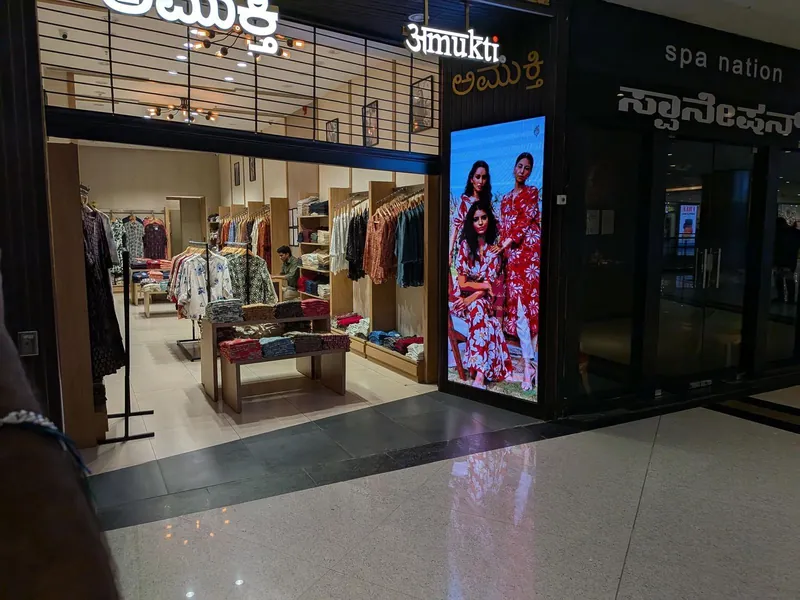
- Jewellery and fashion showrooms. Customers film the collection on the wall to send home. A banded video of a necklace is not the message you paid for. See the jewellery showroom LED wall guide.
- Wedding halls, temples and churches. Videographers and guests film every stage moment. The wedding hall LED wall page covers stage backdrops.
- Office lobbies and town halls. Walls appear in livestreams, video calls and on the CCTV at reception.
- Event stages and studios. Broadcast cameras are the strictest test there is.
- Restaurants and pubs. Match nights and birthday reels, filmed from every table.
The honest list of walls that will never be filmed is very short. A 1,920 Hz panel saves a little money up front and loses it the first time your launch video goes out with bars across the screen. Annual day in a school auditorium, filmed by every parent, is the same test; the college and school auditorium guide specifies it.
Refresh rate
Smooth to the eye. Clean on camera.
3,840 Hz and 14-bit grey scale on every indoor pitch we build, from P1.2 to P2.5.
Grey scale: the other half of a smooth picture
Grey scale, or bit depth, is how many brightness steps each colour has. A 12-bit panel has 4,096 steps per colour. A 14-bit panel has 16,384. More steps mean smoother gradients: skin tones, a sunset sky, a dark scene in a film, the soft background of a presentation slide.
Grey scale matters most when the wall is dimmed, which indoors is all the time. A standard indoor panel runs at a fraction of its full brightness, and a panel with too few steps loses its lowest ones first. Dark areas break into blotches, gradients show steps, and colours can drift. Our brightness guide explains why indoor walls run dimmed; this is why grey scale has to survive it. A jewellery showroom, where the wall runs dim beside real gold, is where this shows first; see the jewellery showroom buying guide.
Why refresh, grey scale and brightness compete
All three are paid for with the same thing: the driver chip’s time. Finer pitches use higher scan ratios, 1/43 on P1.8 and 1/64 on P1.2, so each LED gets a shorter slice of every cycle and the drivers must work harder to hold brightness without flicker. A low-priced panel can be set up to show a good refresh figure at reduced grey scale, or a good grey scale at reduced refresh. So ask for both numbers together, at the brightness the wall will actually run.
1,920 Hz or 3,840 Hz: what should you specify?
| Refresh rate | To the eye | On camera | Right for |
|---|---|---|---|
| 1,920 Hz | Smooth | Rolling bands on phone video | Walls that are never filmed |
| 3,840 Hz | Smooth | Clean on phones and broadcast cameras | Showrooms, halls, lobbies, stages, studios |
Indoor PixelSpot pitches ship at 3,840 Hz and 14-bit grey scale.
Outdoors, modules are made at anywhere from 1,920 to 3,840 Hz depending on the driver chip. For any facade that will appear in reels or on television, we specify 3,840 Hz on the quote.
What to ask a vendor before you sign
- The refresh rate in hertz. In writing, for the exact module on your quote.
- The grey scale. 14-bit or better, held at the brightness you will run.
- The driver chip and scan ratio. Refresh comes from the driver chips and the receiving cards, not the LEDs themselves.
- The controller model. Every PixelSpot quote names it: Novastar or Huidu.
- Film it yourself. Record normal video, then switch to slow motion. Slow-motion mode uses a very fast shutter and exposes a weak refresh rate in seconds. Our demo walls in Indiranagar and Jalahalli East are there for exactly this.
Filming an LED wall well
Even a 3,840 Hz wall can show faint lines at an extreme shutter speed. Ask your videographer to keep the shutter near 1/50 or 1/100 of a second when the wall is in shot. That also avoids flicker from ordinary lights running on India’s 50 Hz mains supply.
If what you see is a wavy, rainbow-like ripple rather than bands, that is not refresh at all. It is moiré, the camera’s own pixel grid clashing with the wall’s. It depends on pitch and camera distance; step back, zoom slightly or change the angle and it goes. Pixel pitch, explained covers how that grid is laid out.
Where to go next
Refresh rate is invisible right up to the moment it matters, which is usually the day of your launch. Specify 3,840 Hz on day one, and use the LED wall configurator to see what your wall costs at that standard.
Questions? Answers.
What refresh rate should an LED video wall have?
Is refresh rate the same as frame rate?
Why does my LED screen show lines when I record it on a phone?
Does grey scale matter if the refresh rate is high?
Can the refresh rate of an existing LED wall be raised?
See it running. Then decide.
Send your wall size on WhatsApp for a same-day price, or see indoor and outdoor walls running at our Jalahalli East experience centre in Bengaluru.
Prices are estimates: installed, controller extra, plus 18% GST. See every price